A standard travel eSIM works on a cruise when the ship is docked or sailing close enough to the coast to pick up a land-based network. Once the ship is far offshore, your phone can only reach the ship’s own maritime cellular network. That network is a different, far more expensive service, and a regular travel eSIM does not cover it. So the smart setup is simple: use a land-based eSIM on shore days, and use the ship’s Wi-Fi or nothing at all at sea.
This guide explains how each option works, what it costs, how to avoid a surprise bill, and how to choose a plan for your itinerary.
Roameogo
Stay Connected on Port Days
RoameoGo offers travel eSIM data in 190+ destinations, helping you connect to local networks ashore without swapping physical SIM cards.
Explore travel eSIMs
At a glance
- A regular travel eSIM connects to local towers, so it works in port and near the coast, but not out in open water.
- At sea, phones can latch onto the ship’s maritime network, which is billed at premium rates and usually excluded from roaming allowances.
- Before boarding, turn on Airplane Mode, switch Wi-Fi back on, and disable data roaming on your main SIM.
- Use a land-based eSIM for shore excursions, maps and ride bookings, and ship Wi-Fi if you need heavy data onboard.
- Check that your phone supports eSIM and install the plan before you leave home.
Table of Contents
Why cruise connectivity is different from normal travel
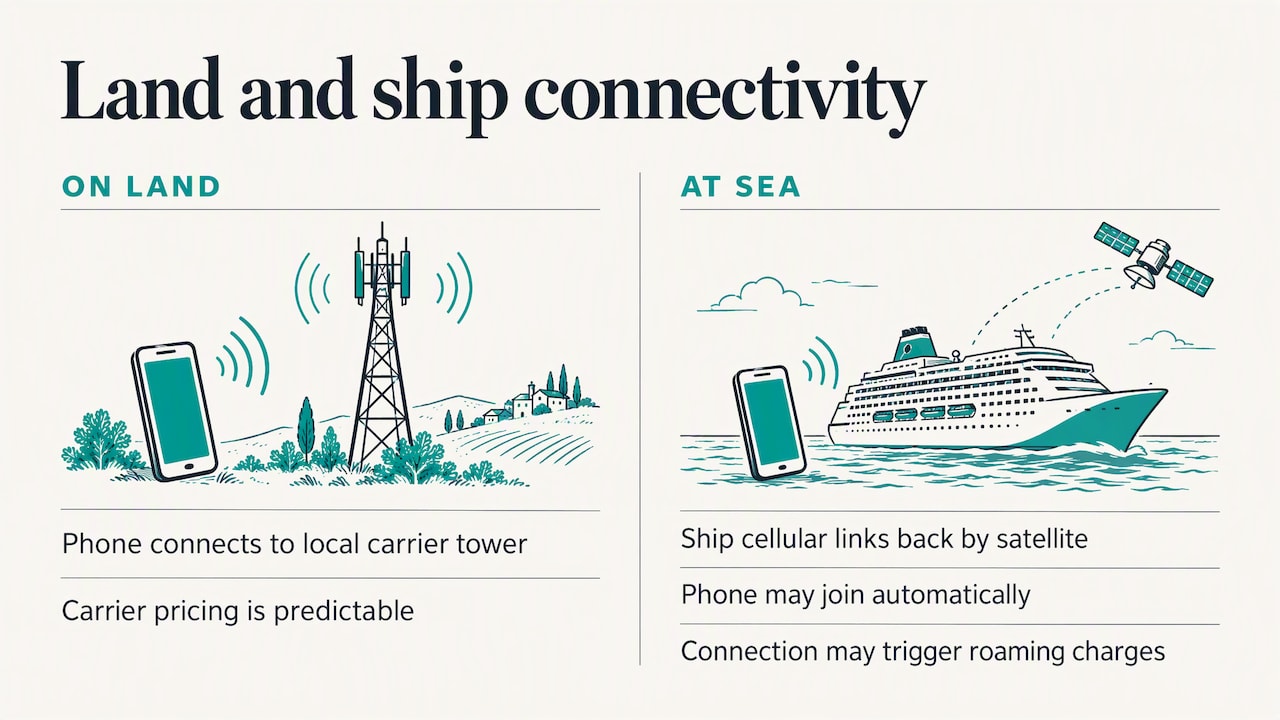
On land, your phone connects to a tower run by a local carrier. Your home plan or a travel eSIM has an agreement with that carrier, so the price is predictable.
A ship breaks that pattern. In international waters, there are no land towers within range. Ships install their own small cellular systems that connect back to shore by satellite. Your phone sees this as just another network, and it often joins automatically. Cruise Critic notes that cell service at sea usually comes through a maritime service once the ship reaches international waters, and your carrier may treat it as roaming.
This is why a bill can spike even when you have done everything right on land. Industry guidance for 2026 says maritime rates can exceed $2.00 per megabyte, or about $15.00 per day for pass-based services with limited data. It also says connecting to these networks can trigger charges from a single text or a background app update.
Does an eSIM work on a cruise ship?
It depends on where the ship is and what kind of eSIM you have.
| Situation |
Land-based travel eSIM |
Ship Wi-Fi package |
Ship’s maritime cellular |
| Docked in port |
Works |
Works |
Usually not needed |
| Sailing near the coast |
Often works, signal varies |
Works |
May connect automatically |
| Open sea |
No signal |
Works (satellite) |
Works, at premium rates |
| Best for |
Shore days, maps, rides |
Heavy, multi-device use |
Occasional short texts |
There are also specialist maritime eSIMs designed to connect to ships’ cellular networks. They can be handy for light messaging at sea, but they are a different product from a standard travel eSIM, and their coverage depends on the ship. If you are considering one, check that your exact ship and sailing are on the supported list before you pay.
The three options for 2026 are ship Wi-Fi (best for heavy use), maritime cellular eSIMs (best for moderate use in open water) and land-based travel eSIMs (cheapest, but only in port or near the coast).
What it costs: at sea versus in port
The gap is wide. The same guidance puts local port-based eSIMs at roughly $3 to $10 for a port stop, well below ship Wi-Fi or maritime roaming.
Here is how the cost logic plays out on a typical week:
- Seven days, three port days, four sea days. A land-based eSIM covers the three port days. Sea days use ship Wi-Fi for a short window or nothing at all.
- Seven days, six port days. A land-based eSIM does almost all the work, and you may not need a ship package.
- Remote itinerary with long sea stretches. Consider a ship Wi-Fi plan for the days you must be online, and keep your eSIM for ports.
The pattern is the same: pay land prices wherever land exists, and pay ship prices only for the hours you truly need them.
How to avoid bill shock before you board
The main risk is not buying the wrong eSIM. It is your phone quietly joining the wrong network. Cruise Critic’s advice and Ofcom’s guidance on using your mobile abroad both point to checking your plan and speaking to your provider before you travel. In practice:
- Install your eSIM at home. Do it on home Wi-Fi, where setup is easy. Our guide to how an eSIM works covers the steps.
- Turn off data roaming on your main SIM. Do this in your phone settings, and leave it off for the whole trip. This stops the phone from attaching to the ship’s network on your home plan.
- Switch on Airplane Mode when you leave port. Then turn Wi-Fi back on manually so you can use the ship’s internet. Airplane Mode with Wi-Fi on is the safest at-sea setup.
- Turn the travel eSIM on when you dock. Switch off Airplane Mode, enable the eSIM line for data, and keep roaming off on the primary SIM.
- Watch for the network name. If your phone shows the name of a maritime network rather than a local carrier, switch back to Airplane Mode.
- Pause background updates. App refreshes and photo backups can use data without you noticing.
If you want to double check, call your home carrier before sailing. Plans differ, and your carrier is the only one who can tell you whether ship networks are billed to your account.
How much data will you actually need?
Experts stress that cruise connectivity is not one size fits all. Messaging and email are light, while video streaming and heavy browsing need more capacity, which is where ship Wi-Fi still makes sense.
For port days only, a rough guide:
- Maps, messaging, a ride or a ticket: a small plan is usually enough.
- Photos shared live, video calls, and navigation all day: pick a mid-size plan.
- Family of four, each on a phone: plan for more data or share one device as a hotspot, if your plan allows it.
Remember that your phone will also use data when you are on a shore excursion and your group is booking tickets, checking opening times and translating menus. It adds up faster than most people expect.
Choosing an eSIM for port days
Cruise itineraries cross borders quickly. One day you are in Spain, the next in Italy, then Greece. Buying a separate eSIM per country is a nuisance, so look for one of these:
- A regional or global plan that includes every country on your itinerary.
- A plan that is reusable, so you can top up for your next sailing without installing a new eSIM.
- A provider that lets you ask a real person if something does not connect.
Before buying anything, write down your port list and check it against the plan’s coverage. Our eSIM countries and eSIM destinations pages list where our plans work. Also confirm your phone is compatible with our guide on how to check eSIM compatibility, and make sure it is carrier unlocked.
Our plans for cruise port days
Our plans are land-based eSIMs. They are built for the days you step off the ship, not for connecting to a ship’s maritime network, and we would rather tell you that plainly than have you find out at sea.
Payment is one-off, with no subscription. Check each plan page for the countries covered and the validity period before you buy, and match them against your port list.
A few features matter for cruisers in particular:
- Instant delivery by email. You can buy and install before you leave, or even the night before.
- Reusable eSIM. Install once, then top up for future trips without reinstalling. Our explainer on reusable eSIMs shows how it works, which suits anyone who cruises more than once.
- Premium Europe plans with calls and SMS. Useful if you need to phone a tour operator or a restaurant. See what the Premium Europe eSIM includes.
- WhatsApp support. If something does not connect in a port, you can message a person rather than hunt through a help page.
If you are comparing eSIMs with your home carrier, our article on eSIM versus roaming breaks down the costs. Browse every option on our plans page, or see the whole range at RoameoGo.
We sell eSIMs, so you might expect us to say that an eSIM solves everything on a cruise. It does not, and saying so would cost you money.
What we see in how travelers use connectivity is a clear split. On land, a local-data eSIM is almost always the cheapest and simplest way to stay online. At sea, the ship controls the connection, and the ship decides the price. Pretending a land eSIM can bridge that gap is how people end up with a surprise charge.
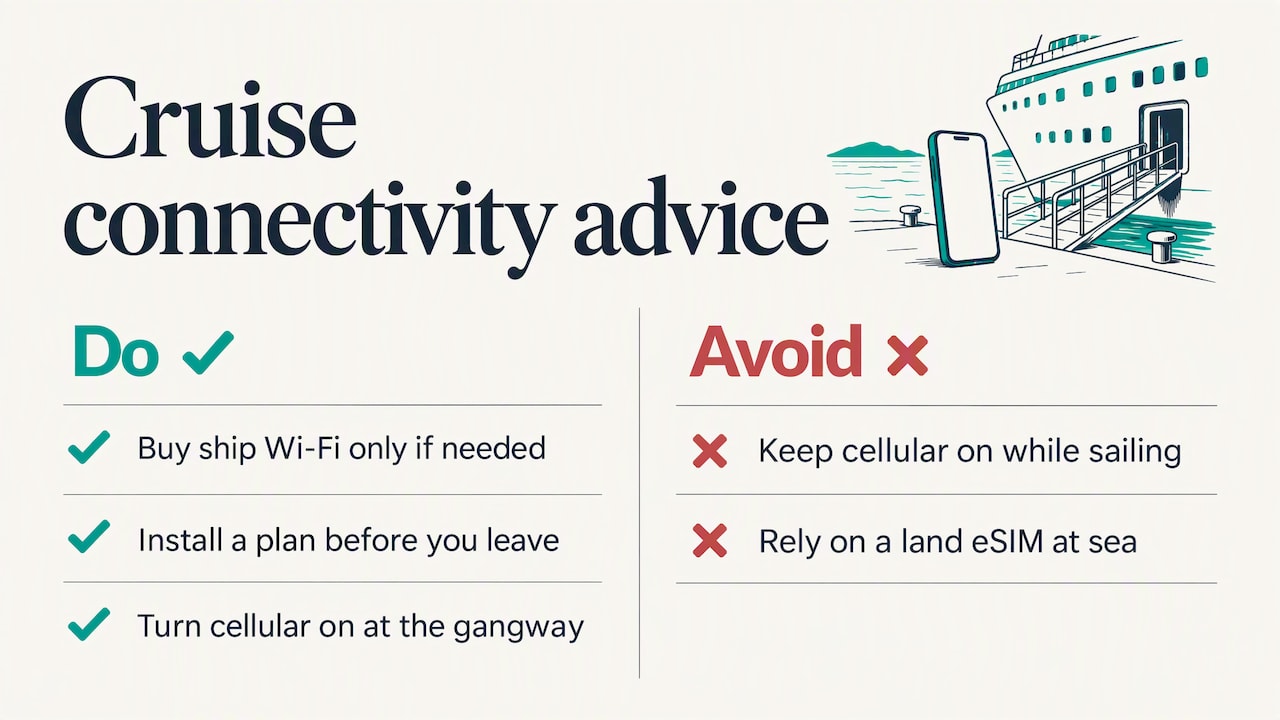
So our advice is to treat the cruise as two trips in one. For the ship, decide how much you need to be online and buy a Wi-Fi package only if you really do, or enjoy the downtime. For the ports, install a plan before you leave, keep cellular off while sailing, and turn it on as the gangway goes down.
The features we built around, a reusable eSIM, instant email delivery and a WhatsApp line to a real person, come from the same idea: connectivity should be one less thing to think about while you travel. If you cruise again next year, top up the eSIM you already have rather than starting again.
— Kieron
A simple plan for your sailing
Here is a quick checklist you can follow from booking to disembarkation.
One to two weeks before
- Check your phone supports eSIM and is unlocked.
- List every port and country on your itinerary.
- Decide whether you need ship Wi-Fi for work or family, and compare the cruise line’s package prices.
The day before
- Install your travel eSIM on Wi-Fi at home or in the terminal.
- Confirm data roaming is off on your main SIM.
- Download offline maps and your boarding documents.
On board
- Switch to Airplane Mode before leaving port, then turn Wi-Fi on.
- Use messaging apps over ship Wi-Fi if you need to stay in touch.
- Keep an eye on any network name that appears on your phone.
In each port
- Turn off Airplane Mode and select your eSIM for data.
- Save screenshots of your return time and the ship’s contact number.
- Switch back to Airplane Mode before the ship leaves.
Many cruisers fly in a day early or stay on after the ship docks. On our site you can compare flights, hotels, car hire and travel insurance, all in the same place you pick your eSIM. We do not set prices for these, since they come from the comparison providers we link to, so check the final price when you book.
FAQ
Does an eSIM work on cruise ships?
A standard travel eSIM works in port and near the coast, where it can reach local towers. In open water, it usually has no signal because only the ship’s maritime network is available. Specialist maritime eSIMs exist for that network, but they are a separate product, so check your ship is supported.
Will I get roaming charges on a cruise?
You can, if your phone connects to the ship’s cellular network. That network is excluded from almost all standard roaming allowances. Keep data roaming off, use Airplane Mode with Wi-Fi at sea, and ask your carrier how it bills ship networks.
Can I use one eSIM for a whole multi-country cruise?
Often yes, if you choose a regional or global plan that covers every port country. Match the plan’s coverage list to your itinerary before you buy. Our Global Travel eSIM page shows the available data sizes.
Is ship Wi-Fi better than an eSIM?
They do different jobs. Ship Wi-Fi works at sea and suits streaming or several devices, while a land-based eSIM is cheaper on shore days. Many travelers use both: Wi-Fi onboard, eSIM in port.
Sources
Recommended
Written with BabyLoveGrowth, the AI SEO writer
Cover photo: David Vives / Unsplash.
 eSIM Guides
ROAMEOGO
eSIM Guides
ROAMEOGO